
How to use Gemini Guided Learning: step-by-step tutor mode
Turn on Guided Learning in Gemini on a computer or phone, get step-by-step help instead of answers, and make quizzes and flashcards.
Checked and updated 14 November 2026 at 21:45 UTC
Key points
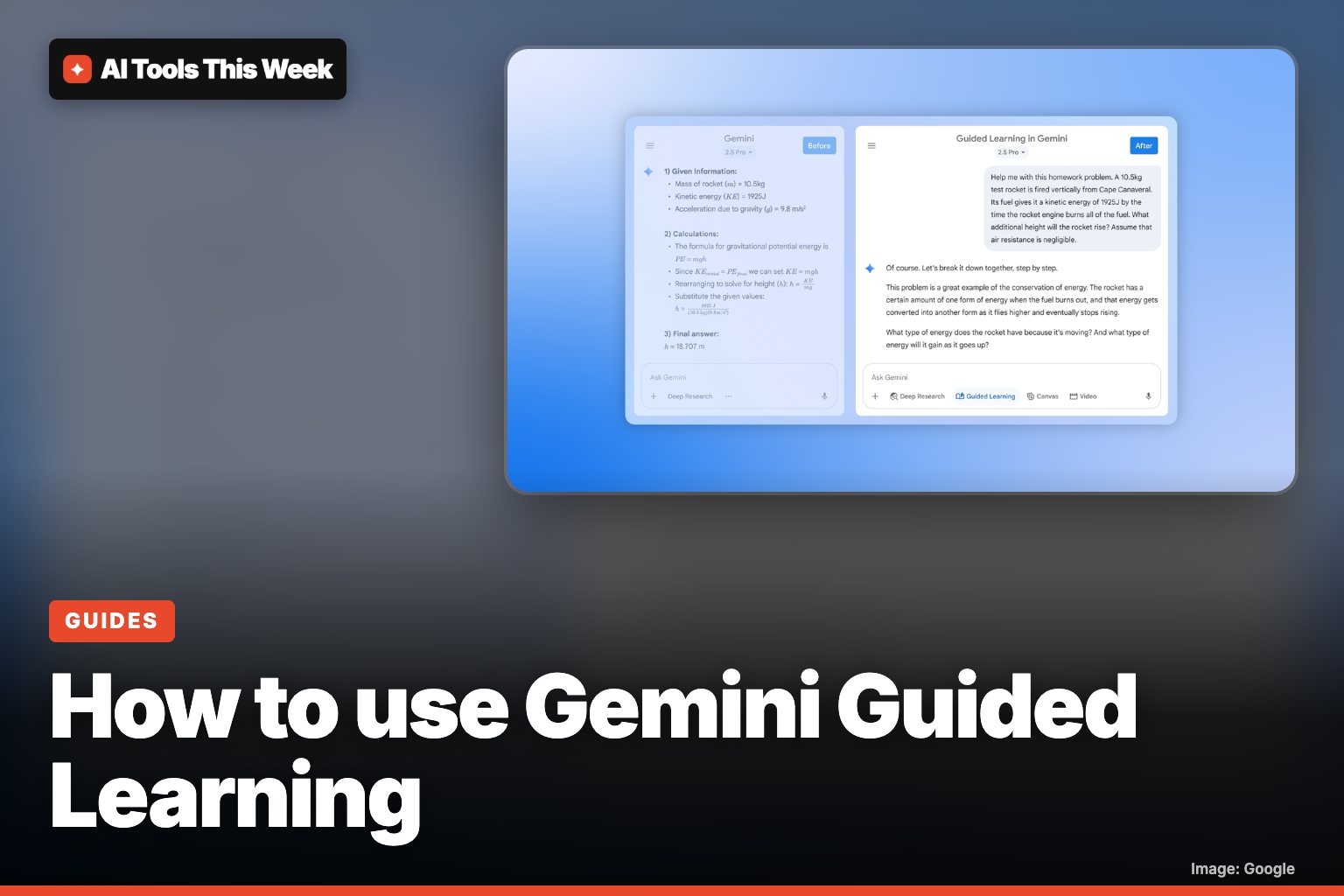
- Guided Learning is a tutor mode in Gemini. Instead of handing you the answer, it breaks a problem into steps and asks you questions along the way.
- To turn it on at gemini.google.com, click Add files in the text box, then More tools, then Guided Learning. On a phone, tap Add files and then Guided Learning.
- You need to be signed in. Gemini can also turn a topic into quizzes, flashcards and study guides, with hints and a score at the end.
Guided Learning is Gemini's tutor mode: instead of giving you the answer, it walks you through a topic step by step, asks you questions and checks you understand. To turn it on at gemini.google.com, click Add files in the text box, then More tools → Guided Learning, and type what you want to learn.
It works on the web and in the Gemini app. Here's exactly how to use it, based on Google's help page.
How to turn on Guided Learning
On a computer
- Go to gemini.google.com and sign in with your Google account.
- In the text box, click Add files (the + icon).
- At the bottom, click More tools, then Guided Learning.
- Type your question or topic, for example "Help me understand compound interest".
- Optional: click Add files → Upload files to add your notes, a worksheet or a photo of a problem.
- Click Submit.
On a phone or tablet
- Open the Gemini app or go to gemini.google.com.
- Tap Add files in the text box.
- Tap Guided Learning at the bottom.
- Enter your topic and tap Submit.
Google says it's still rolling the learning features out in the mobile app. If you don't see them, try the website.
What it does differently
Google built Guided Learning on LearnLM, its models tuned for teaching, and launched it in August 2025. A normal chat answer just solves the problem. Guided Learning:
- breaks the problem into smaller steps
- asks open-ended questions so you do the thinking
- adds images and diagrams, and YouTube videos if Gemini Apps Activity is on
- adjusts the explanation to how you answer
Teachers can share a direct link to Guided Learning in Google Classroom.
Make quizzes, flashcards and practice tests
Gemini can also turn any topic or file into study material (Google's guide). Start your prompt with what you want:
| Type | Example prompt | What you get |
|---|---|---|
| Quiz | "Create a quiz about the French Revolution" | Questions with Hint, Next, Back and More questions |
| Flashcards | "Create flashcards about cell biology" | Cards with hints, shuffle and text to speech |
| Study guide | "Create a study guide about chapter 4" | A guide you can open as a doc in Canvas |
| Practice test | "Generate a full length practice test for the SAT" | Timed sections and a score summary (SAT, JEE Main, NEET UG) |
After a quiz, wait a moment and Gemini lists your strengths and the areas to work on.
Limits to know
- You must be signed in to Gemini.
- Typing @OpenStax makes Gemini answer from OpenStax textbooks, but that, and asking for practice questions with feedback, is for now English only, US only, and not for users under 18 or work and school accounts.
- Like any AI, it can make mistakes, so check key facts against your course material.
For more ways to get Gemini to help you, see how Gemini's memory works and our list of the best free AI tools. School account? Read what changed for Google school accounts and AI search.
AI Tools This Week is not affiliated with Google.
Frequently asked questions
Where is Guided Learning in Gemini?
On a computer, go to gemini.google.com, click Add files in the text box, then More tools and Guided Learning. On a phone, open the Gemini app or website, tap Add files and then Guided Learning. Google is still rolling it out in the mobile app, so use the website if you don't see it.
Is Gemini Guided Learning free?
Google's help page only says you must be signed in to Gemini; it doesn't list a paid plan as a requirement. Some extras, like OpenStax textbook answers, are limited to English, the US and adults with personal accounts.
Will Guided Learning just give me the answer?
Not by default. It's designed to walk you through the reasoning with questions, examples and images. You can still ask it directly to show a worked solution.
Sources
Related
How to make a Gemini Storybook (November 2026 guide)
Gemini Storybook turns a prompt, photos or a PDF into a 10-page illustrated book with narration. Steps, prompt ideas, limits and who can use it.
How to make GIFs in Gemini (November 2026): steps and limits
Gemini now makes ~3-second looping GIFs from a prompt, photo or video with Omni 1.2 Flash. Steps, the 8 countries, and whether you need a paid plan.
Is Gemini free? What the free plan includes (November 2026)
Yes: Gemini is free with a Google account, including Deep Research, Gemini Live, Tasks and 15 GB storage. Paid plans run $4.99, $19.99 and $99.99+ a month.
Mentioned in
- Gemini Live on Google Home speakers: faster upgrade, $10/month
- Is Gemini free? What the free plan includes (November 2026)
- Claude for Teachers: free until July 30, 2028 (how to sign up)
- How to change Gemini's voice: 66 new regional voices (Nov 2026)
- How to make an interactive site with Gemini Notebook (Nov 2026)
- How to make a Gemini Storybook (November 2026 guide)